Day 6 Task: File Permissions and Access Control Lists
TABLE OF CONTENTS
Create a simple file and do ls -ltr to see the details of the files.
Write an article about File Permissions based on your understanding from the notes.
Create a simple file and do ls -ltr to see the details of the files
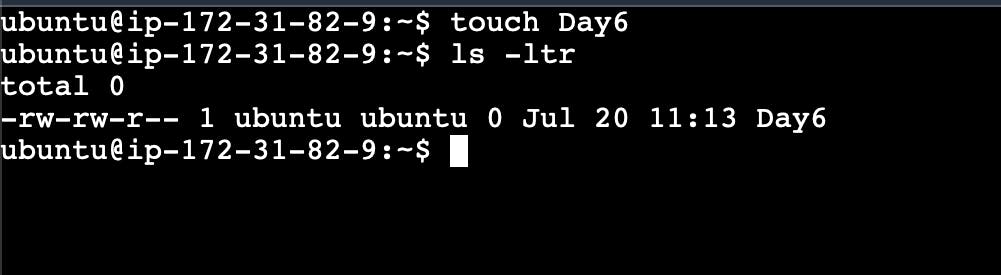
Each of the three permissions is assigned to three defined categories of users. The categories are:
owner — The owner of the file or application."chown" is used to change the ownership permission of a file or directory
group — The group that owns the file or application."chgrp" is used to change the group permission of a file or directory.
others — All users with access to the system. (outside the users are in a group)"chmod" is used to change the other user
's permissions of a file or directory.As a task, change the user permissions of the file and note the changes after
ls -ltr
Write an article about File Permissions based on your understanding from the notes.
File permissions in Linux are a fundamental aspect of the operating system's security model. They determine who can access, modify, or execute files and directories. Linux file permissions are represented using a combination of letters and symbols, known as the permission mode or permission string.
The permission mode consists of three sets of permissions, each set indicating the access rights for different groups: the owner of the file, the group associated with the file, and all other users (sometimes referred to as "others").
The three basic permissions are:
Read (r): Allows reading or viewing the content of the file. For directories, it allows listing the contents of the directory.
Write (w): Permits modifying the file's content or deleting the file. For directories, it allows adding, removing, or renaming files within the directory.
Execute (x): Enables executing the file if it is a script or a binary executable file. For directories, it allows accessing the contents of the directory.
Read about ACL and try out the commands
getfaclandsetfaclACLs (Access Control Lists) provide more fine-grained access control compared to traditional file permissions. With ACLs, you can assign specific permissions to individual users or groups beyond the standard owner, group, and others.
ACLs are represented using an extended syntax that includes additional access permissions and qualifiers, such as read-data, write-data, execute, delete, and more. The
getfaclcommand displays ACL information and thesetfaclcommand allows you to modify ACLs.


